RiskLive
Start here
Risk follows the decision, not the tool.
- Most AI risk registers list the model, not the decision
- Start a risk register from the decision inventory
/risk/start-here/What could go wrong and what do we do about it?
Sometimes things go wrong. This part is about guessing what could go wrong before it happens, and agreeing who fixes it if it does.
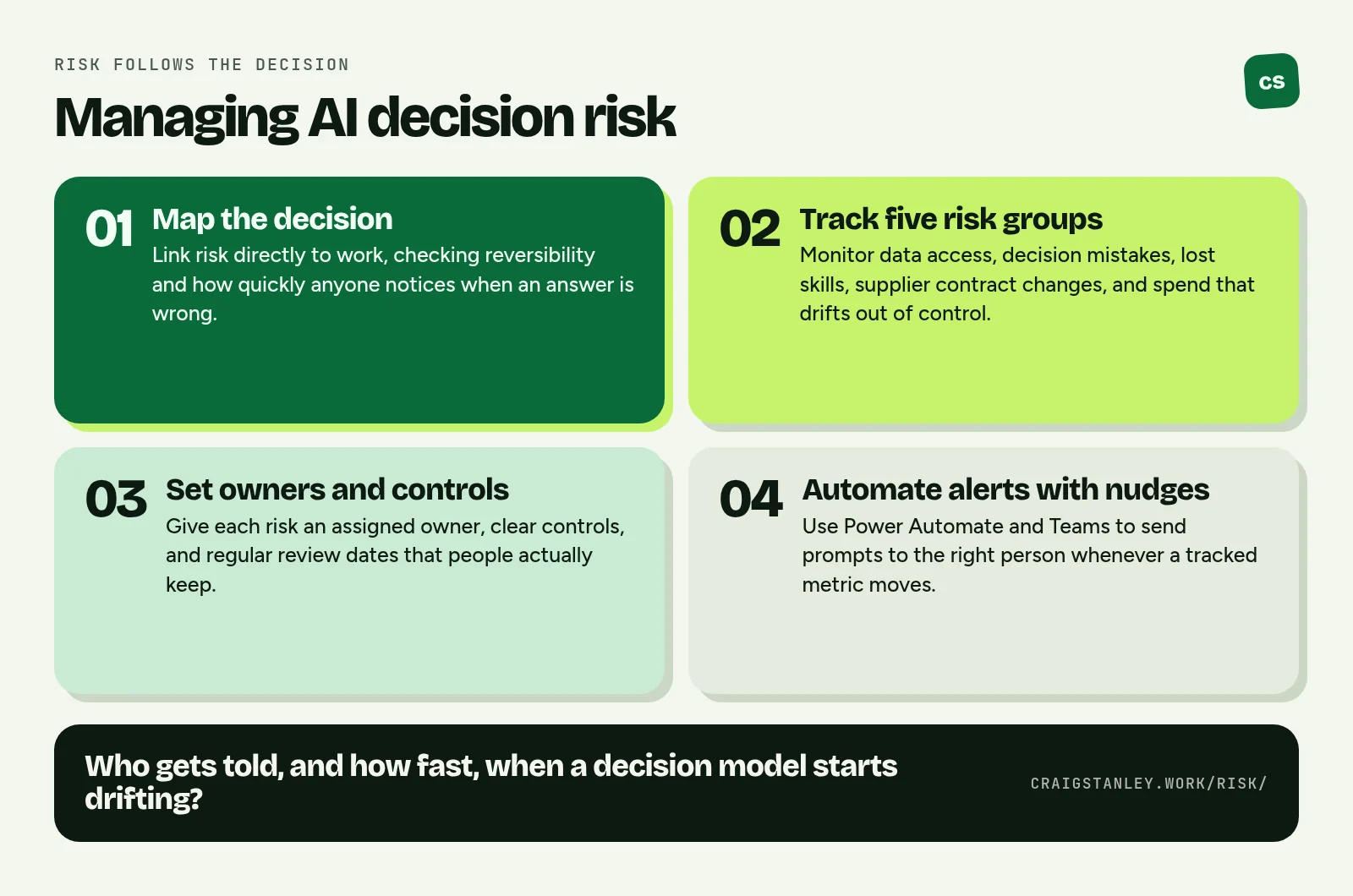
Most AI risk lists are about the model. The bigger risks sit in the decision: who relies on the answer, what happens if it's wrong, and how quickly anyone notices. I map risks to the work, rank them, and set up automatic nudges so the right person hears about a problem in time.
Once you know how work gets done and what the tools can do, map the risks to the work and the decisions as well as the model. Then prioritise, mitigate and track, and build automations that push the right task to the right person at the right time.
From Craig Stanley's site: the Risk section. Most AI risk registers list the model. They track hallucinations, data leaks or bias, but those lists don't tell teams what to do on Monday. A model might be harmless drafting a meeting summary, yet dangerous approving a payment. Craig argues that risk depends on the decision the model feeds. His questions focus on consequences. He asks who relies on the answer without checking it, and how long before anyone notices a mistake. Problems usually fall into five groups: data, decision, people, supplier and cost. A register that nobody reads changes nothing. Craig focuses on turning every risk into an assigned owner and an automated check. Tools organisations already own, such as Power Automate and Teams, can handle most of this work. They send automated nudges to the right person when a metric shifts. The governance stack puts Agent 365, Purview and the Copilot control system into practice. That keeps reviews active and ties oversight to real work. Who gets told, and how fast, when a decision model starts drifting?
Summary written and read aloud with Google Gemini from the text on this page. The voice is synthetic. Longer episodes are in the podcast.
A typical AI risk register lists the model: it might hallucinate, it might leak data, it might be biased. Those are real, but they don't tell you what to do on Monday. The same model can be harmless drafting a meeting summary and dangerous approving a payment. The risk depends on the decision it feeds.
So this section maps risk to the work. For each decision a model touches, ask:
Most problems fall into one of five groups: data (wrong access, wrong source), decision (wrong answer acted on), people (skills lost, trust broken), supplier (price, terms or product changes) and cost (spend that drifts out of control). The risk map page covers each one with examples.
A register that nobody reads changes nothing. The goal is to turn each risk into an owner, a check and a nudge, an automated message that reaches the right person when a number moves. Power Automate and Teams can do most of this with what you already own.
Read Most AI risk registers list the model, not the decision.
Risk follows the decision, not the tool.
/risk/start-here/Types of risk by work activity and capability.
/risk/risk-map/Likelihood, impact and reversibility on one sheet.
/risk/prioritise/Owners, controls and review dates that people keep.
/risk/mitigate/Automations that turn insight into an action, a task or a question for a person.
/risk/nudges/Agent 365, Purview and the Copilot control system in practice.
/risk/governance/Why AI risk registers full of generic model risks don't help, and how to rebuild them around the decisions models feed.
ReadRisk · Start hereHow I turn a team's decision inventory into a first risk register in about an hour, with one row per decision and five questions per row.
ReadRisk · Risk mapA simple way to group AI risks at work into five types, with examples and a first control for each.
ReadRisk · Risk mapA grid that places risks against the activities a role performs, so you can see where AI changes the risk and who should own it.
ReadRisk · PrioritiseA one-sheet scoring method for AI risks that adds reversibility and time to detect to the usual likelihood and impact, with a worked example.
ReadRisk · PrioritiseAn irreversible decision needs a different control from one you can undo. Why I score reversibility separately, and how it changes AI design choices.
ReadRisk · Mitigate and trackMost AI risk controls fail because they depend on people remembering. Four tests for a control that will still be working in six months.
ReadRisk · Mitigate and trackEvery risk register has review dates and most are missed. How I set review dates by trigger and calendar, and make the reminder impossible to ignore.
ReadRisk · NudgesFour ways to get the right signal to the right person at the right time, using scheduled flows, Teams cards, Cowork tasks and, later, Autopilot.
ReadRisk · NudgesEvery automated alert decides who to interrupt, when and with what. Treating nudges as decisions helps you set their limits and retire the useless ones.
ReadRisk · Governance stackWhat Microsoft Agent 365 does, which parts come with ordinary Microsoft 365 plans, which need E7 or the add-on, and where it fits in a risk register.
ReadRisk · Governance stackCopilot finds what people can already open. How Purview's data risk assessments and SharePoint controls help find and fix oversharing before rollout.
ReadA question to take awayWho gets told, and how fast, when a decision model starts drifting?