WorkLive
Start here
Why map work before you buy tools.
/work/start-here/People at work make lots of choices every day. I help them see each choice clearly. Sometimes a small computer helper gives a hint, a person still says yes or no, and anyone can see how it worked.
Every job is full of small decisions: approve this, send that, buy one more licence. I find the ones that cost the most when they go wrong, add a small AI model that gives a score you can check, and write up how it works so your team can carry on without me.
I map how work gets done, find the decisions that cost money, and put small, visible AI behind them on the Microsoft stack. Then I publish the method so your people can repeat it.
I write this site to learn in public. Why I do it this way
Read in order. Understand the work, decide better, know the tools, manage the risk, control the cost, then plan.
From Craig Stanley's site: the home page, Decide in the open. Craig is a Microsoft AI consultant in the North East of England. He maps how work gets done, finds decisions that cost money, and puts small, visible AI behind them on the Microsoft stack. Every job is full of small decisions: approve this, send that, buy one more licence. He finds the calls that cost the most when they go wrong, adds a checkable score, and publishes the method so teams can carry on without him. To start, he sits with the people doing the work to watch approvals, tickets and handovers. He describes roles in O*NET and ESCO terms, listing decisions and what is at stake. Next, a repeated decision is scored using Microsoft-Decision-1 or Jev, setting agreed thresholds with the people affected. He deploys into Microsoft 365, Copilot Studio or Foundry, with Agent 365 and Purview in place. Decision theory keeps routine calls cheap while people keep close calls. The method stays written down so anyone can copy it. Which repeated decision would you trust a cheap model to score first, with a person checking the close calls?
Summary written and read aloud with Google Gemini from the text on this page. The voice is synthetic. Longer episodes are in the podcast.
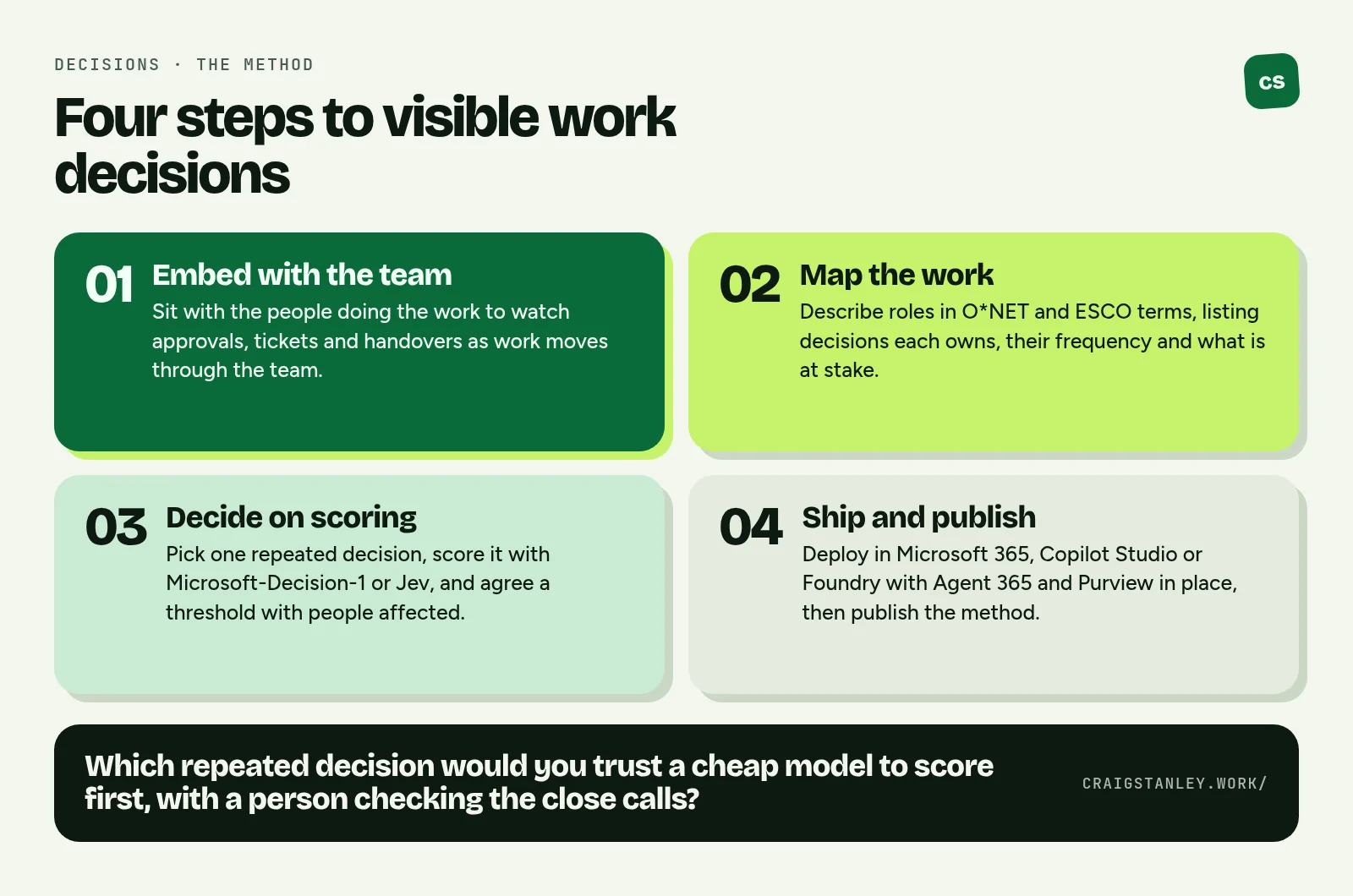
Four steps, in order. Each one leaves the team with something it keeps.
Sit with the people doing the work. Watch the approvals, tickets and handovers, not the org chart.
Describe the roles in O*NET and ESCO terms and list the decisions each one owns, with how often they come up and what's at stake.
Pick one repeated decision. Score it with a cheap model such as Microsoft-Decision-1 or Jev, and agree a threshold with the people affected.
Deploy in Microsoft 365, Copilot Studio or Foundry with Agent 365 and Purview in place. Publish the method.
Six good places to begin. Every article opens with the same idea explained three ways.
What, why, when, how and who. Five questions that take two minutes and stop most bad work decisions before they start.
ReadDecisions · Decision modelsA decision model scores a fixed set of options and says how confident it is. It's smaller, cheaper and easier to audit than a general chatbot.
ReadWork · Start hereWhy mapping what people actually do should come before choosing AI tools, and a five-step way to do it with public frameworks.
ReadDecisions · Decision theory at workA plain explanation of expected value with a worked example from the service desk, and the two places it misleads.
ReadRisk · Start hereWhy AI risk registers full of generic model risks don't help, and how to rebuild them around the decisions models feed.
ReadCost · Start hereLicences, consumption and people's time. Most AI budgets track the first, some track the second, and almost none track the third.
ReadWhat do we actually do all day?
Before you fix a job, you need to know what the job is. I draw a picture of all the little things people do at work, so we can see where the choices are.
Governments keep big lists that describe thousands of jobs as tasks and skills. The US list is called O*NET and the EU one is ESCO. I use them to draw a map of what your team really does, then mark the places where someone has to make a call.
O*NET and ESCO describe thousands of occupations as tasks, skills and work activities. Used carefully, they give you a shared map of the work before anyone talks about AI, and they show where the decisions sit.
Why map work before you buy tools.
/work/start-here/The US Department of Labor's model: tasks, work activities, work context.
/work/onet/The EU's skills, competences and occupations classification.
/work/esco/Turning task lists into decision points with frequency, stakes and reversibility.
/work/tasks-to-decisions/One page per common role: tasks, decisions, where AI helps and where it shouldn't.
/work/role-cards/Job descriptions, ticket logs, approvals and Viva Insights as evidence.
/work/work-data/A question to take awayCould you list the ten decisions your team makes most often, with how long each takes?
How do we decide better, cheaply and in the open?
A decision is picking one thing out of a few. I help people pick well. A small computer helper says "I think this one" and shows why. When the choice is big or tricky, a person decides.
Lots of work decisions repeat: approve or reject, escalate or close, buy now or wait. Decision theory gives you simple tools for these, like weighing what you'd gain against how likely it is. A small, cheap AI model can score the routine ones while people keep the close calls, and the method is written down so anyone can check it or copy it.
Decision theory, game theory and a few well-tested habits, applied to everyday work decisions. Put a small, cheap, observable AI model behind the routine choices, keep people on the ones that matter, and publish the method so anyone can reuse it. Start here if you want to save money, make money and give colleagues firmer ground to stand on.
What, why, when, how and who, before any decision.
/decisions/start-here/Expected value, value of information, thresholds and calibration without the maths anxiety.
/decisions/decision-theory/Budgets, bids, negotiations and other choices where people react to each other.
/decisions/game-theory/Anchoring, loss aversion, outcome bias and how to spot them in meetings.
/decisions/bias/Small models that score fixed options: Microsoft-Decision-1, Jev and Copilot Studio patterns.
/decisions/decision-models/Write down the options, the information and your confidence at the moment you decide.
/decisions/decision-records/Every method on the site, free to reuse, with a worked example.
/decisions/method-library/A question to take awayWhich repeated decision would you trust a cheap model to score first, with a person checking the close calls?
What can Microsoft's tools do today?
Microsoft makes lots of computer helpers, and they all have different names. This part tells you what each one does, what it costs, and when you'd use it.
Microsoft sells a lot of AI products and the names change often. On 25 September 2026 Microsoft announced a new Copilot built around Home, Code and Autopilot; as of 11 October 2026 Home and Code are rolling out through its Frontier early-access programme and Autopilot is in private preview. Here I explain each product in plain terms: what it does, what it costs and which decisions it can help with.
On 25 September 2026 Microsoft announced a new Copilot built around Home (Chat and Cowork together), Code (apps and automations built from a description) and Autopilot (a persistent agent). None of the three is generally available: as of 11 October 2026 Home and Code are rolling out to the Frontier early-access programme and Autopilot is in private preview (source: Official Microsoft Blog, 25 September 2026). This section covers what each product does, what it costs and where it fits a decision, starting with decision models such as Microsoft-Decision-1.
What decision models are on Microsoft's stack, starting with Microsoft-Decision-1.
/capabilities/start-here/Microsoft's new Copilot, announced 25 September 2026 and still in preview: Chat and Cowork merged, tenant-hosted app building, a proactive agent.
/capabilities/home-code-autopilot/The free, web-grounded tier and what it can safely do.
/capabilities/copilot-chat/The paid licence, grounded in your work data.
/capabilities/m365-copilot/Gathering sources around one piece of work.
/capabilities/notebooks/Shared, editable AI output.
/capabilities/pages/Light agents for individuals and teams.
/capabilities/agent-builder/Agents over sites and libraries.
/capabilities/sharepoint/Governed agents with actions, flows and connectors.
/capabilities/copilot-studio/Multi-step work across skills and apps, now part of Home.
/capabilities/cowork/Models, agents and evaluation on Azure, including Microsoft-Decision-1.
/capabilities/foundry/A question to take awayWhich of these do you already pay for and not use?
What could go wrong and what do we do about it?
Sometimes things go wrong. This part is about guessing what could go wrong before it happens, and agreeing who fixes it if it does.
Most AI risk lists are about the model. The bigger risks sit in the decision: who relies on the answer, what happens if it's wrong, and how quickly anyone notices. I map risks to the work, rank them, and set up automatic nudges so the right person hears about a problem in time.
Once you know how work gets done and what the tools can do, map the risks to the work and the decisions as well as the model. Then prioritise, mitigate and track, and build automations that push the right task to the right person at the right time.
Risk follows the decision, not the tool.
/risk/start-here/Types of risk by work activity and capability.
/risk/risk-map/Likelihood, impact and reversibility on one sheet.
/risk/prioritise/Owners, controls and review dates that people keep.
/risk/mitigate/Automations that turn insight into an action, a task or a question for a person.
/risk/nudges/Agent 365, Purview and the Copilot control system in practice.
/risk/governance/A question to take awayWho gets told, and how fast, when a decision model starts drifting?
What does it cost and how do we keep it honest?
Computer helpers cost money. This part is about knowing how much they cost, and giving spare money to the people who need it most.
AI costs come in three kinds: licences, pay-as-you-go use and people's time. I help teams set a budget, check it every week, and move unused allowance to the people who've run out, so the spending follows the work.
With the work, the decisions, the tools and the risks in view, set realistic budgets, forecasts and reviews. Review daily and weekly, and move unused allowance to the people who've hit their limits, so the money follows the work.
Licences, consumption and people time in one view.
/cost/start-here/Sustainable budgets per team and per agent.
/cost/budgets/Forecasting consumption from decision volumes.
/cost/forecasts/A 20-minute review with a fixed agenda.
/cost/weekly-review/Move daily and weekly unused allowance to people at their limit.
/cost/underspend-pooling/When a seat licence beats metered use, and when it doesn't.
/cost/licence-or-payg/A question to take awayIf you moved last week's unused AI allowance to the people who ran out, who would get it?
What's coming to Microsoft 365, and what's next here?
Microsoft keeps a public list of what it's making for Microsoft 365. This page lets you search that list and see roughly when each thing might arrive.
Search and filter the Microsoft 365 public roadmap by product, status, release phase, platform and date. Every item links back to Microsoft. The dates are Microsoft's targets, so check them before you plan around one.
A live, filterable view of the Microsoft 365 public roadmap feed by product, status, release phase, platform, cloud and date, with shareable links and every item tied to its roadmap ID. Dates are Microsoft's targets: confirm the ID before you commit budget or training to one. My own plan for this site sits below the explorer.
What's being built and published, and in what order.
/roadmap/plan/What shipped, what didn't, what changed.
/roadmap/quarterly/What's coming and how much attention it deserves.
/roadmap/horizon/Public repos and experiments.
/roadmap/building/A question to take awayWhich item on this list changes a decision your team has already made?